
How to edit vimiGoal 2.0 settings?
- Happy Marine VIMIGO
- Jun 19, 2024
- 1 min read
Updated: Jun 20, 2024
Download File:
Guideline:
Step 1: Head over to All Feature Tab at the top of the website 🡪 Under Rewards list, click on vimiGoal 2.0 Settings.

Step 2: VimiGoal 2.0 Settings page 🡪 Click on Edit on the goal that you want to edit.

Step 3: Pop-up page will appear 🡪 Start to edit the vimiGoal, Description, Points, Scoring and arrange it accordingly

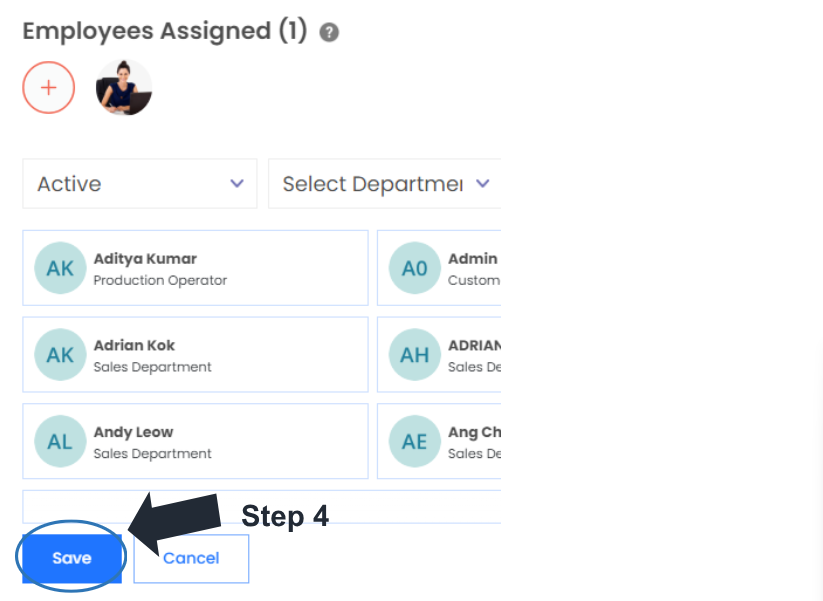
Step 4: Click on Save button on the bottom of the page
Step 5: Save 🡪 3 types of edit buttons will appear: Edit Current, Edit Future, Edit Current & Future.
**Edit Current: Allow you to make and save all the changes for the current month you are editing at.
**Edit Future: Allow you to remain everything for the current month and start to make changes for the future month. (Eg: You are editing November, your changes will only start from December)
**Edit Current & Future: Everything will directly change from the current month until the future.

Step 6: Edit Current & Future 🡪 A message stated ‘vimiGoal is updating now for current & future’ will appear.




Comments