
How to mark an employee as resigned/disabled/delete?
- Happy Marine VIMIGO
- Jun 24, 2024
- 1 min read
Download File:
Guideline:
Step 1: Head over to All Features Tab at the top of the website 🡪 Under Company list, click on People.

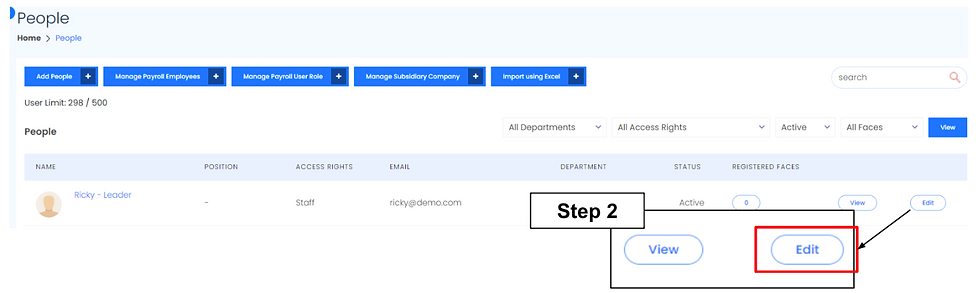
Step 2: Click Edit of the selected employee.
Step 3: Edit Profile Page 🡪 Scroll down and find Status.

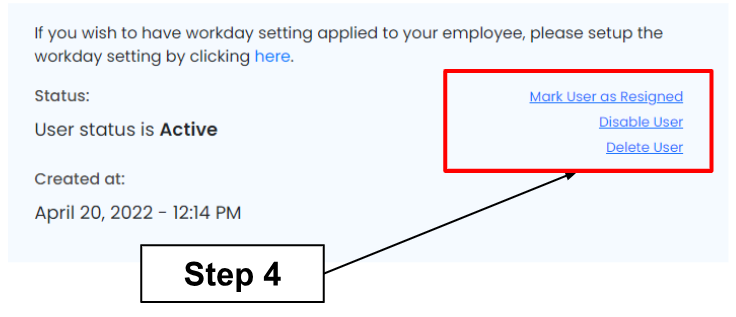
Step 4: There are 3 types of status. Click “Mark User as Resigned” or “Disable User” or “Delete User”.
Mark User as Resigned
User cannot be reactivated.
Commission will be stopped.
Payouts will be distributed to other employees.
Email will not be reusable.
Step 1: Fill in the employee resignation date
Step 2: Choose Remove commission and goal settings instantly or Remove commission and goal settings from future periods
Step 3: Fill in the resignation remark (Optional). Click Next.

Step 4: You can distribute payout to selected employees or skip this step.

Disable User
User can be reactivated.
Payouts will not be distributed to other employees.
All data of the employee will still exist.
Not an active account.
Click Deactivate User to deactivate user.

Delete User
Everything will be permanently deleted.
There is no payout distributed.
Click OK to permanently delete the user.


Comments