
What is vimiReview? How to create vimiReview and send it to customers?
- Happy Marine VIMIGO
- Jun 21, 2024
- 1 min read
Download File:
Guideline:
What is vimiReview?
is similar to a quick survey or a review form.
How to create vimiReview & send it to customers?
Step 1: Head over to All Features Tab at the top of the website 🡪 Under Future list, click on vimiReview.

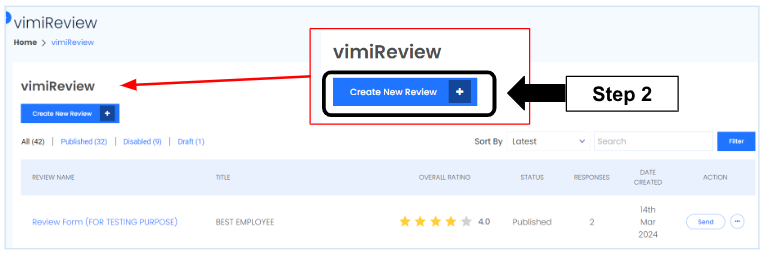
Step 2: Click Create New Review.
Step 3: Fill in all the details of vimiReview.

Step 4: Apply existing template or create a new template.

Step 5:
If you want to save it first and work on it later, click Save as Draft
Once completed, click Publish.

Step 6: Go to the last page to find the new created vimiReview. Click the
3 dot icon and click View Response.

Step 7: Click Send Review.

Step 8: Send vimiReview via WhatsApp Phone or copy link.


Comments